
TPO (Market Profile)
TPO (Market Profile) shows where the market spent its time. Every 30 minutes gets its own letter, printed at every price it traded through, one profile per session, side by side.
On this page
What it is
Each TPO period (30 minutes as standard) gets a letter: A, B, C and so on. That letter is printed at every price traded in its period. Prices the market kept coming back to get wide rows; prices it rushed through stay thin.
How to read it
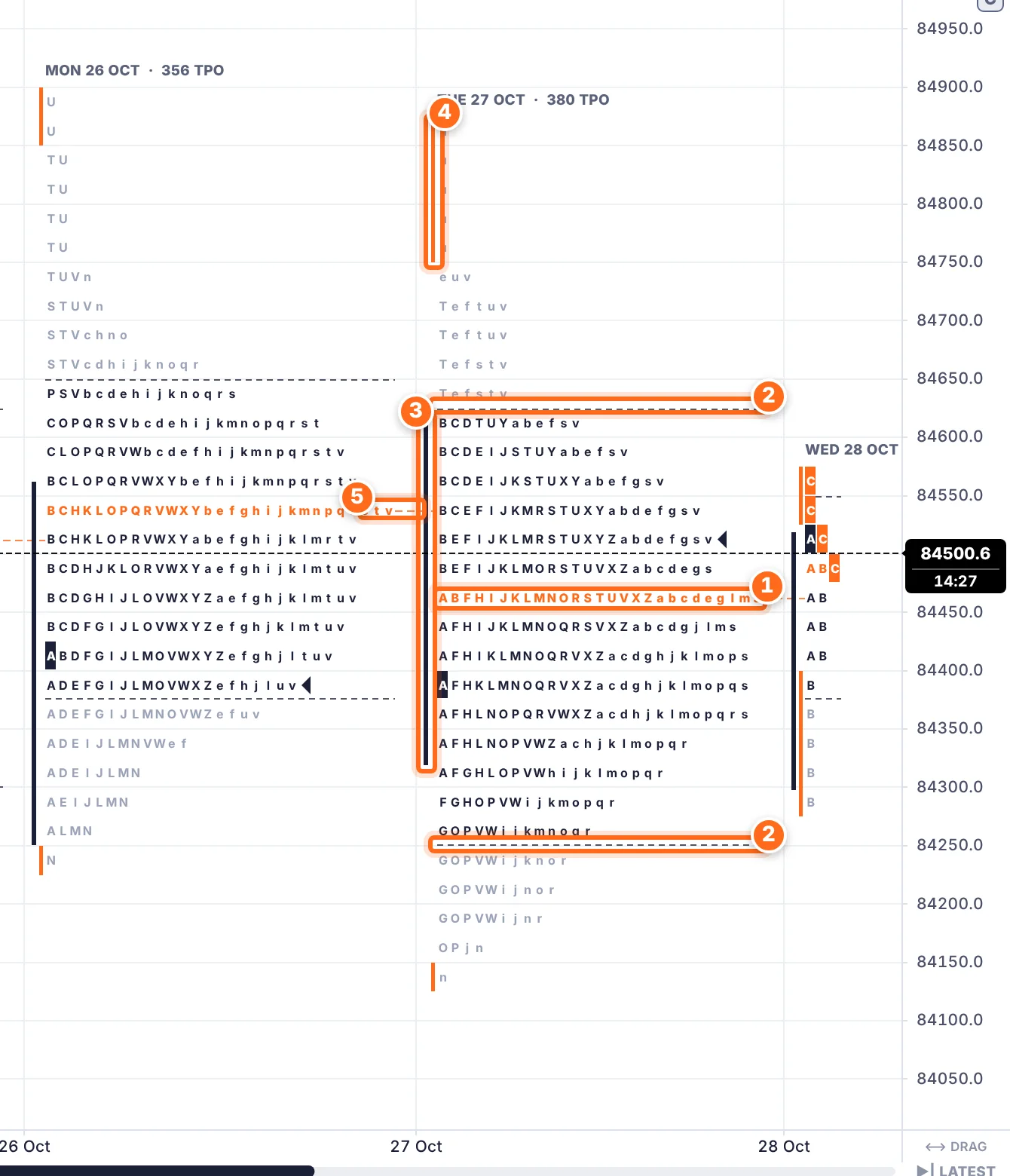
- POC: the row with the most letters (orange).
- Value area: VAH and VAL lines hold 70% of the letters.
- Initial balance: the bar on the left covers the first hour.
- Single prints: orange strips where price passed only once.
- Naked POC: a dashed orange line carried right until price trades back to it.
- Wide rows = prices the market accepted. Thin rows = prices it rejected.
- POC (orange): the row with the most letters.
- Value area (dark letters, VAH / VAL lines): holds 70% of the letters.
- Initial balance: the bar on the left, the first hour of the session.
- Single prints: orange strips where price passed only once.
- Poor high / low: a flat line of letters at the top or bottom (no excess), often revisited.
- Open and close: the open's letter is solid; the arrow marks the close.
- Naked POCs: dashed orange lines not yet traded back to.
Many traders trade from value: the last session's VAH, VAL and POC are the levels to watch. Opening outside value and failing to get back in often means a trend day; getting back in often means price rotates to the other side of value. Naked POCs and poor highs / lows act like magnets.
Turn it on
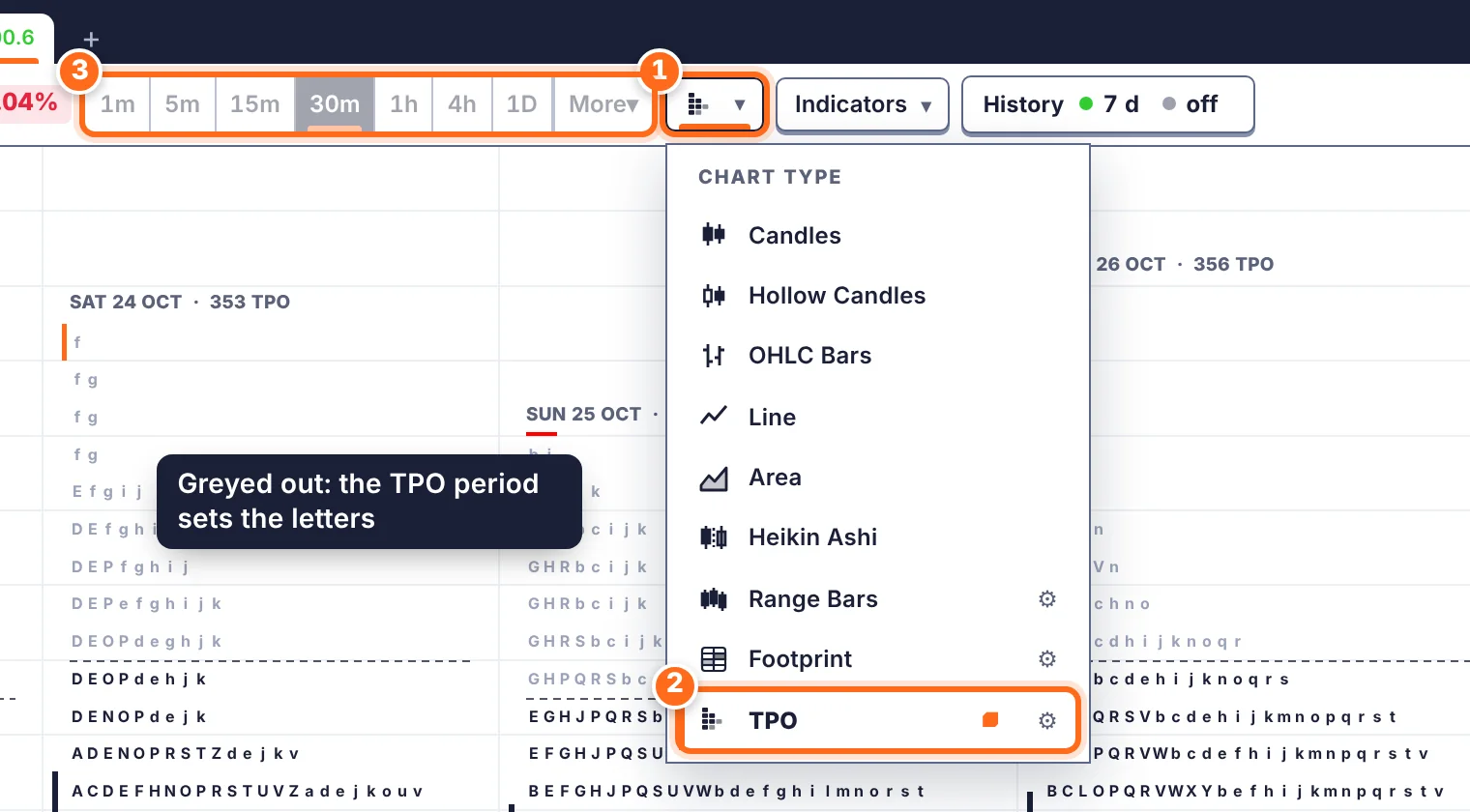
- The chart type button.
- TPO. Its ⚙ opens the TPO settings.
- The timeframe buttons grey out: the TPO period sets the letters.
- Click the chart type button in the toolbar.
- Click TPO.
- Zoom in to see the letters (Ctrl + mouse wheel, or the wheel-zoom button). Zoomed out they show as blocks.
Settings
| Setting | What it does |
|---|---|
| Profiles | |
| TPO period · one letter | 5, 10, 15, 30 (standard) or 60 minutes. |
| One profile per | Session (day), 8, 4, 2 or 1 hour, or week. |
| Session | When each day starts: a time you set (with its time zone, UTC or your computer's), or a session from your library (Crypto day, Asia, London, New York, Funding). |
| Ticks per row | 0 = automatic. Set a number to fix it; the price per row is shown. |
| Initial balance (minutes) | Length of the initial balance (60 = the first hour). |
| Value area (%) · method | How much the value area holds, worked out two rows at a time (CBOT standard) or one row at a time. |
| Look | |
| Layout | Profiles side by side (standard), on the time axis, or on the time axis split by period. |
| Show TPOs as | Letters when there's room (else blocks), always letters, or always blocks. |
| Colour by | Value area (in / out), period (first → last), or one colour, with light and dark theme colours. |
| POC · first / last period colours | Accent colours. |
| Largest letter size · Letters on a light tile · Faint candles behind | How letters look, and candles behind the profiles. |
| Levels & marks | |
| POC row · POC line · VAH / VAL lines · Shade the value area | The key levels. |
| Naked POCs | Carried right until traded through. |
| Initial balance bar · IB extensions (½×, 1×, 2×) | The IB and its extensions. |
| Single prints · Poor highs / lows | Orange strips and flat-edge marks. |
| Open and close | Solid first letter and close arrow. |
| Date and TPO count over each profile | The label above each profile. |
| Templates | |
| Save as template · Load | Save your TPO setup and load it on any chart. |
Tips
Questions
Why do I see blocks, not letters?
You're zoomed out. Zoom in (Ctrl + wheel) or set Show TPOs as to Letters.
How do I make each profile one week?
Set One profile per to Week.